
Authentication
CrawlBrain uses two credentials: an API key for your server and an agent key for the widget in the browser. Getting them mixed up is the one mistake worth being careful about.
API keys
An API key is for server-to-server calls and has full access to your account, so treat it as a secret.
Creating a key takes 46 seconds on video:
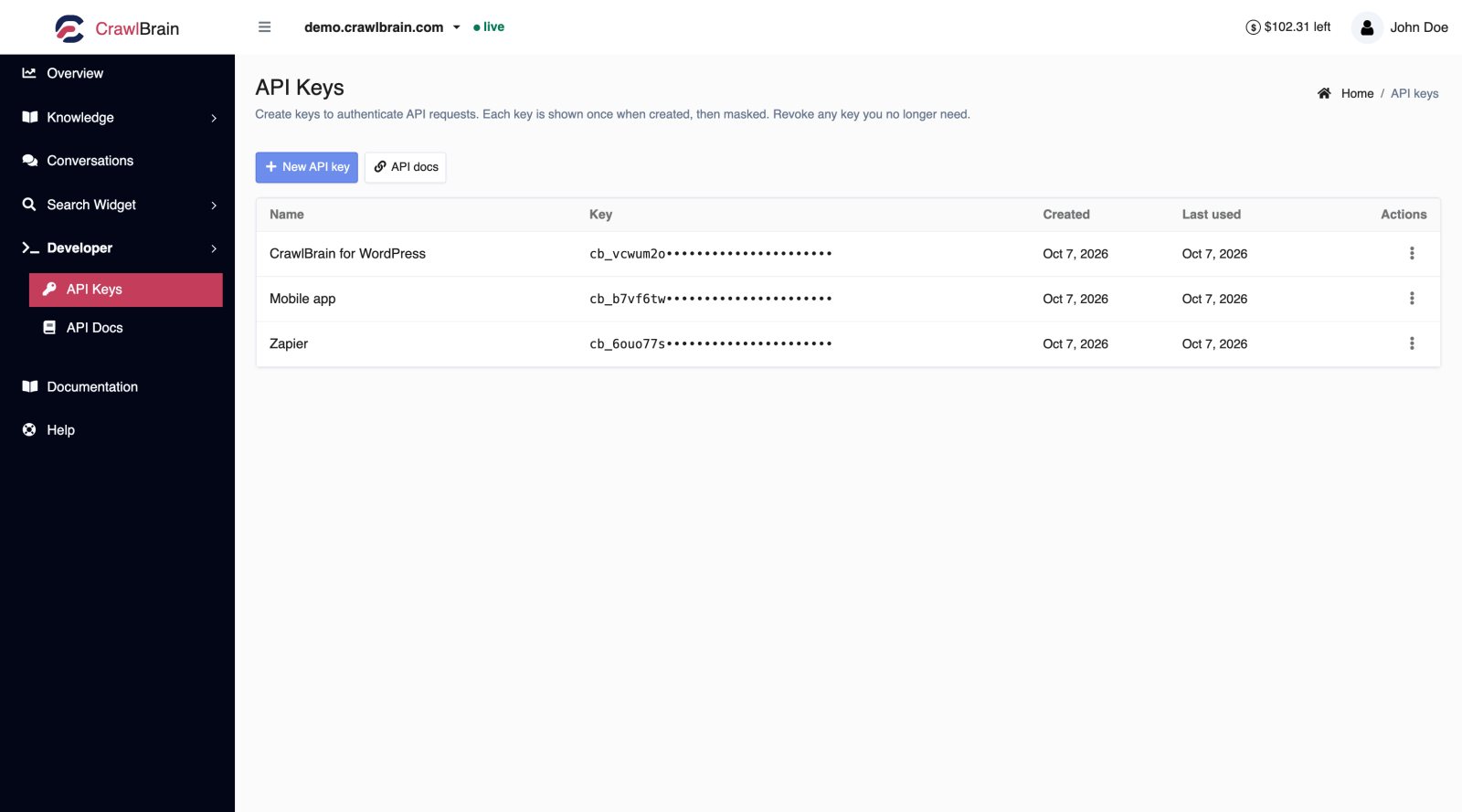
Open Developer → API Keys.
Creating one
Click New API key and give it a name that says where it will be used before you save.
The key is shown once. Copy it immediately into your password manager or your secret store. After you close the dialog it is masked forever, because CrawlBrain stores only a hash of it and cannot show it to you again.
If you lose one, revoke it and make another, which is faster than any recovery process could be.
Using one
Send it in the Api-Key header.
curl https://api.crawlbrain.com/v1/website/list \
  -H "Api-Key: cb_your_key_here"
Keys start with cb_, followed by 32 lowercase letters and digits.
Naming and rotating
Name each key after the system that uses it. A key called Zapier or nightly-sync tells you where it lives when you come back to the list, and key 2 or test tells you nothing.
Good names make the Last used column useful. A key that has never been used can be revoked, and a key that stopped being used a month ago is probably attached to something you retired.
To rotate a key without downtime, create the new key and deploy it, wait until the new one shows recent usage, then revoke the old one.
Revoking
Choose Revoke from the row menu. Revoking is immediate and permanent: every request with that key gets a 401 from the next call onward.
Revoke a key without hesitating once it has shown up in a screenshot or a public repository, and the same goes for a support ticket or a chat thread.
Rules
- Server-side only. Never in browser JavaScript, a mobile app bundle, or anything a user can view source on.
- Never in git. Environment variables or a secret manager.
- One key per integration. Then revoking one thing does not break five others.
- Pro active. It is checked live on every request.
Agent keys
The agent key is the widget's key, and it identifies one website's search and nothing else.
<script src="https://cdn.crawlbrain.com/v1/widget.min.js" data-key="YOUR-AGENT-KEY" async></script>
It is public by design, the same way a Google Analytics id is: anyone who opens your page source can see it, and that is fine.
What it can do
An agent key can search and answer from the public content of one website, and that is its entire permission.
It has no access to anything behind your login, from the website list and conversation log to settings and billing. Someone who copies it from your page source can only run searches against content that is already public on your site.
Where to find it
It is inside the script tag on Search Widget → Install, and the API returns it too:
curl "https://api.crawlbrain.com/v1/agent/get?id=WEBSITE_ID" \
  -H "Api-Key: cb_your_key_here"
Using it directly
The agent key goes in a header or in a query parameter, depending on the request:
# Header. Used for POST /agent/query and /agent/feedback.
curl -X POST https://api.crawlbrain.com/v1/agent/query \
  -H "Agent-Key: your-agent-key" \
  -H "Content-Type: application/json" \
  -d '{"question":"Do you ship to Canada?"}'

# Query parameter. Used for GET /agent/search and /agent/settings,
# so the request stays CORS-simple and skips the preflight.
curl "https://api.crawlbrain.com/v1/agent/search?key=your-agent-key&q=shipping"
OAuth 2.0
If you are building a tool that other people's CrawlBrain accounts connect to, do not ask them for an API key. Use the authorization-code flow instead: the user signs in and approves your tool on a consent screen, and your tool receives a cb_ key scoped to their account.
This is what the browser extension and the CMS plugins use. See OAuth 2.0.
Errors
| Response | Cause |
|---|---|
200 invalid_key |
Header missing, or the key does not exist. The status is 200, so check the body |
401 key_revoked |
The key was revoked |
403 pro_required |
Pro is not active. Keys created by the official plugins work without it |
410 gone |
Agent key belongs to a deleted website |
Quick check
| Question | Answer |
|---|---|
| Which key goes in my HTML? | Agent key |
| Which key goes in my server environment? | API key |
| Which one can I show in a screenshot? | Agent key |
| Which one do I rotate if it leaks? | API key, immediately |