
Content Gaps
Every question your site could not answer becomes a ranked gap. You stop guessing what to write next, because your visitors already said it, in their own words.
Finding a gap and fixing it with a snippet takes 43 seconds on video:
Open Conversations → Unanswered.
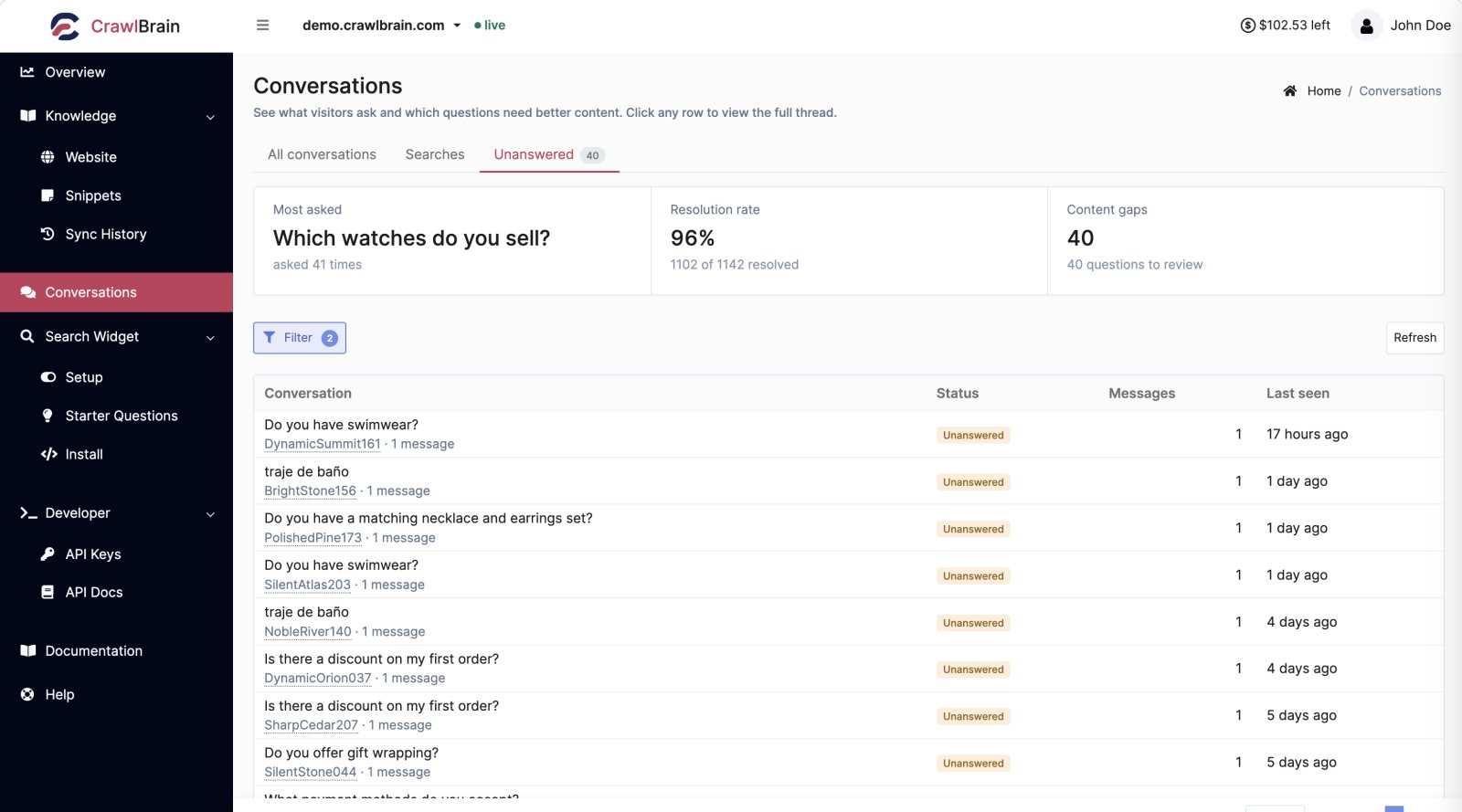
What counts as a gap
CrawlBrain only answers from your content. When the content is missing, the widget tells the visitor it has no answer and logs the question here.
A gap means one of four things, and each needs a different fix:
| Cause | Fix |
|---|---|
| You have never written this down | Write a snippet, or a page |
| You have written it, but the page is not indexed | Check Pages and Sync History |
| The page is indexed, but the text is thin or full of navigation | Fix the extractions in Sync Settings |
| The question is not about you at all | Ignore it |
Expect part of any gap list to be noise from people testing the box, looking for a different company or asking about the weather, and do not chase it.
Closing one
Click the Create snippet link under an unanswered question.
The snippet editor opens with the visitor's exact wording as the title. Write the answer and save. The snippet is indexed within a minute or two, with no re-crawl needed.
You have now answered a question you were previously losing, phrased the way real visitors phrase it, which is also the phrasing that retrieves best.
To see the full context first, click the row and read the thread, then use the Create snippet link under the answer that missed.
Prioritising
Take the list from the top, in this order:
- Frequency first. A question asked 47 times is worth 47 times more than one asked once. The Searches tab, sorted by Times, is the fastest way to see frequency.
- Then commercial weight. "Do you ship to Canada?" is worth more than "who founded the company?" even at the same volume, because one of them is a purchase blocker.
- Then effort. Anything you can answer in three sentences goes now. Anything that needs a real article goes on the content calendar.
Closing five gaps properly beats half-answering fifty.
The weekly digest
The weekly report, sent every Monday, lists the questions your site could not answer the week before, in your visitors' words, with how many times each was asked.
If content gap alerts are on, you also get an alert as soon as unanswered questions pass your threshold. Questions that went unanswered because of an AI outage or an empty credit balance are not counted as content gaps.
Turn it on in Notifications. You can also set a per-website threshold so a quiet site does not email you about two questions.
The digest brings this screen to your inbox every Monday, so the list gets read even in the weeks you forget to open it.
When a gap is really a content problem
Some questions come back as gaps even though you have a page about exactly that.
To read the page CrawlBrain stored, open the row menu on the page in Knowledge → Website and choose View content. You will usually find one of three things:
- The stored text is mostly navigation. Add selectors under Exclude HTML elements in Sync Settings.
- The stored text is almost empty. Your content is rendered client-side. Turn on Render JavaScript.
- The stored text is fine but does not actually answer the question. Your page implies the answer without stating it: a reader fills in the missing step, but retrieval only matches what the text says. Add one explicit sentence to the page, or write a snippet that says it plainly.
That third case is the most common and the most useful thing this screen teaches you about your own writing.
Measuring progress
The Resolution rate card on the dashboard and at the top of Conversations is the score.
It rises as you close gaps and falls when you ship a new product line with no documentation, so read its direction over months rather than day to day.
Two habits
Weekly. Open Unanswered and fix the top three, which takes about ten minutes.
Monthly. Read the whole list without fixing anything, and ask what the pattern is. Twenty unanswered questions about one feature do not need twenty snippets: they point to one missing page, and possibly to one confusing product.