
Credits and Limits
CrawlBrain runs on prepaid credit. You start free and then pay in dollars for the work your site actually does as visitors search and ask, and unused credit never expires. Open Credits from the account menu.
How it works
Every account has one credit balance, in US dollars. AI answers, search results, website syncing, imports, and starter questions all draw on it.
New accounts start with $5 in free credit. That is a one-time signup credit, enough to crawl a small site and generate its starter questions, then try search and AI answers on your own content while you decide. You need no card, and no trial clock counts down.
The Free plan covers 1 website with up to 1,000 indexed pages. It includes AI search and AI answers with source links, follow-up questions and multilingual answers, all on the Balanced AI model, with daily content updates while credit is available.
There are no monthly answer quotas and no monthly reset. Credit sits on the account until it is used.
What things cost
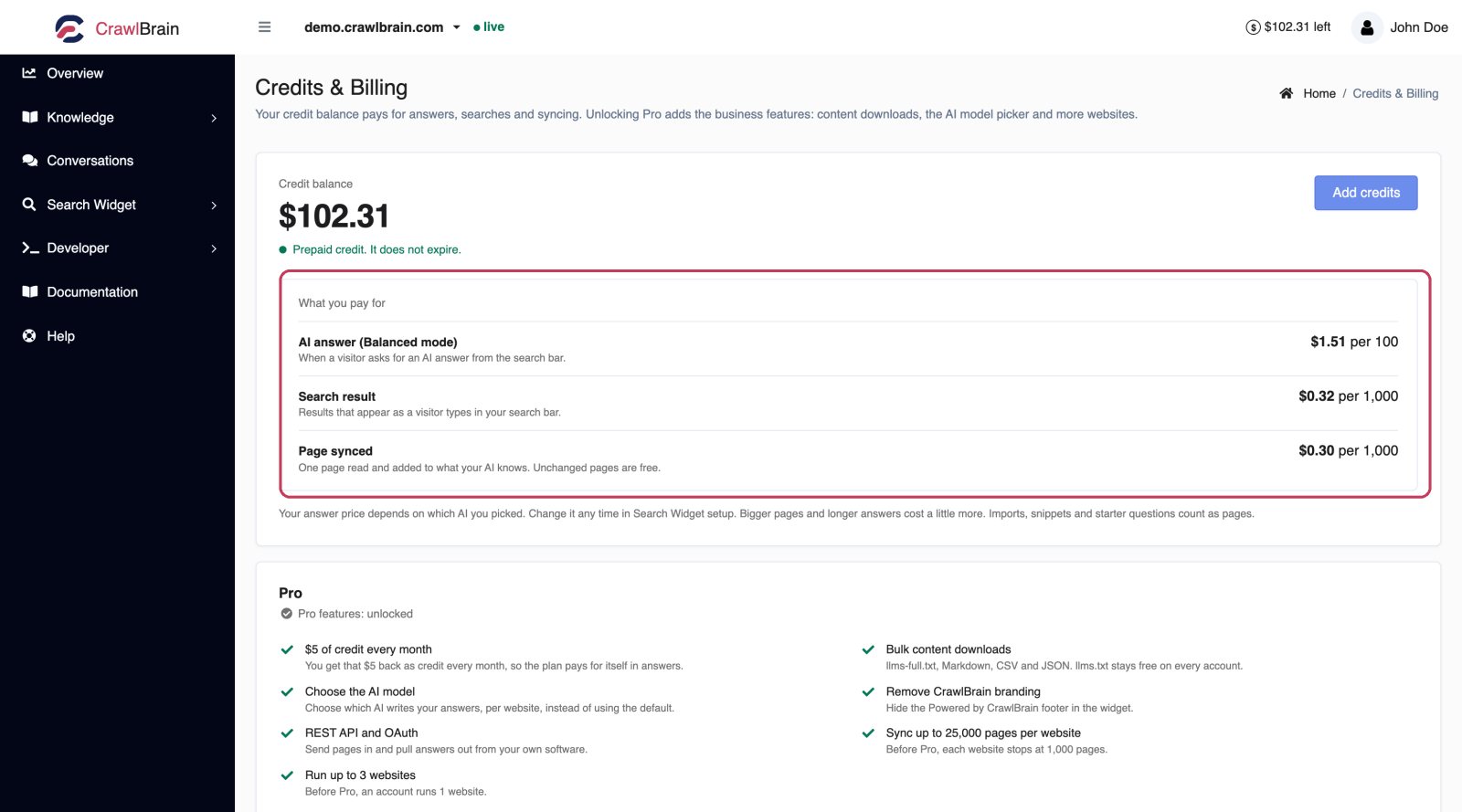
Under the balance, What you pay for lists a live price for each of the three things you spend on.
| Unit | What it is |
|---|---|
| AI answer | A visitor pressed Enter and the AI wrote a grounded reply with sources |
| Search result | A visitor typed and got instant semantic results |
| Page synced | One page crawled and added to the index |
The answer price is the one that moves. It follows the AI model your widget is set to, so the figure here is the same one shown beside that model in Search Widget → Setup, and the same one taken off your balance when a visitor asks something. Change the model and this price changes with it. If your websites run on different models you get a row per model.
Searches and pages cost a small fraction of a cent each. An answer costs more, and how much depends on the AI model: Premium uses the most credit per answer and Cost-optimized the least, with Balanced at the standard amount in between. That gap is why the widget searches as people type and only calls the AI when someone presses Enter.
These are averages across all CrawlBrain accounts, recalculated from real spend rather than quoted from a fixed price list. Usage also depends on your AI model and visitor activity, and on how long your content and answers are. Imports and snippets are charged at the page rate, and so are starter questions.
The daily sync only charges for pages that are new or changed. Checking your sitemap and finding unchanged or deleted pages uses no credit. Rebuild index reads every page again, so it uses credit for all of them.
The three prices are not three budgets. They share one balance, which is deliberate: a busy month of searching cannot strand the credit you needed for a re-sync.
The page shows prices rather than "your balance buys N answers", because any such count has to assume you spend the whole balance on that one thing.
Adding credit
Add credits opens a dialog with a slider, from $5 to $500 per top-up.
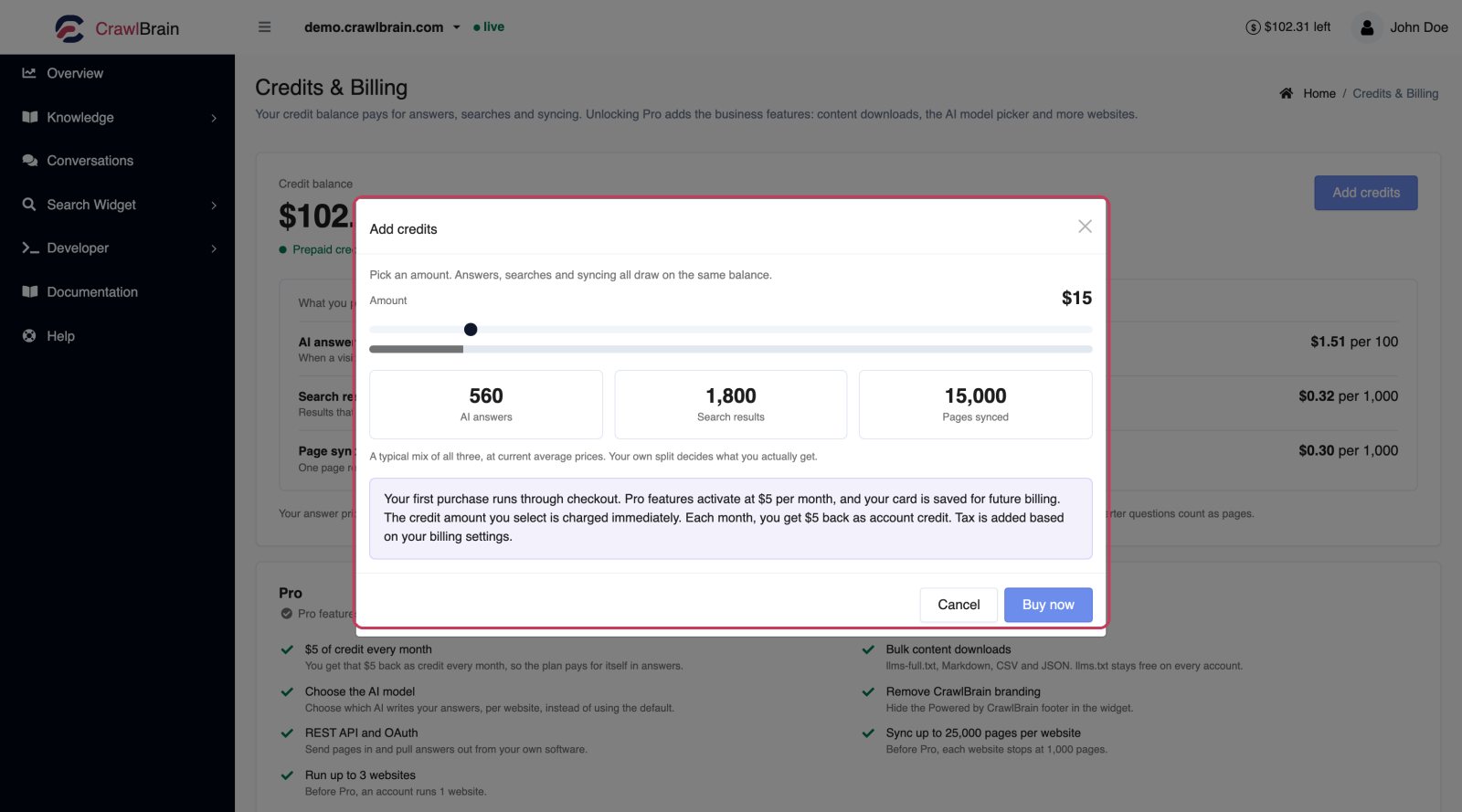
Drag the amount and the three figures underneath update as you move it, showing roughly how many AI answers it buys, plus search results and synced pages. Those are a typical split across all three at current prices, so they add up to what you are buying rather than each claiming the whole of it. Your own usage decides the real split.
Buy now charges your saved payment method once for the amount shown. Tax may be added according to your billing settings.
If you have no card on file, the first purchase sends you through checkout, and that same checkout activates Pro, so the two happen in one step rather than two. After that, topping up is one click with no redirect.
Your first payment is the $5 Pro payment plus the top-up you picked, and both amounts become credit. Taxes are extra and do not become credit.
| Example: a $20 top-up | |
|---|---|
| Pro activation | $5 |
| Selected top-up | $20 |
| Total before tax | $25 |
| Credit added | $25 |
Any signup credit you have left stays on the balance.
Payments are handled by Paddle. See Billing.
What happens when credit runs out
Nothing breaks, and nothing is deleted. Your index and settings stay saved.
AI answers stop. The widget keeps searching and instant results keep appearing, so visitors get a working search box rather than an error.
Search falls back to free keyword search. Visitors can still find pages without using credit. Results are matched on the exact words visitors type, so they may be less relevant.
Syncing pauses. Pages already indexed keep answering, while new and changed pages wait until there is credit again.
Imports and new snippets are blocked, because indexing them is what costs money.
Add credit and everything resumes on the next request. There is no reactivation step.
You get an email when your balance drops below $1 and again when it reaches zero, if low credit warnings are on. They are on by default and worth leaving on.
Pro
There is one paid plan, Pro, at $5 every 30 days. It gives you your own brand and your choice of AI model, plus room for more websites. You activate it by adding credit for the first time: that purchase sets up billing and turns Pro on together, so there is no separate signup to go through.
The $5 goes into your credit balance. Rather than a separate charge on top of credits, it is credit itself, added automatically every 30 days. Pro does not include unlimited usage: answers and search still draw on the balance, and so does indexing. On top of that it adds:
- Bulk content downloads.
llms-full.txt, Markdown bundle, CSV, and JSON.llms.txtstays free on every account. See Exports and llms.txt. - AI model selection. Choose Cost-optimized, Balanced, or Premium per website instead of running on Balanced. See AI Model.
- Remove CrawlBrain branding. Hide the Powered by CrawlBrain footer.
- REST API and OAuth. See API.
- Priority support. Free accounts get email support.
- Higher ceilings, below.
Pro does not stop you buying credit on top whenever you want it, and turning it off does not touch the balance you already have.
Paying yearly
You can also pay for Pro once a year. The yearly price is $50, and $60 of credit goes into your balance as soon as the payment goes through. Compared with paying $5 every 30 days, that is 2 months free. Pro stays on for 12 months and then renews at $50.
Pick Yearly on the Pro card before you add credit for the first time. If Pro is already active, use Switch to yearly on the same card: the 30-day charge stops and the credit you already have stays.
A cancelled yearly plan does not renew. Pro stays on until the year you paid for ends.
The Pro card on the Credits page shows whether Pro is active and when it renews, and lists each feature with a tick or a lock. Manage billing opens Paddle's portal for the payment method.
Ceilings
Two limits depend on whether Pro is active, and your balance has no effect on them. Both are shown at the foot of the Pro card, alongside the AI model your widget answers on.
| Free | Pro | |
|---|---|---|
| Pages per website | 1,000 | 50,000 |
| Websites per account | 1 | 3 |
Neither cap stops what you already have. At the page cap the crawler stops adding new URLs and keeps syncing the ones it has. At the website cap you cannot add another site until you remove one or activate Pro.
If you already have more websites than your current ceiling allows, the count turns amber and reads over the limit. They all keep working, but you cannot add another.
Keeping the bill down
Before adding credit, check whether you are indexing things nobody searches for.
- Exclude the junk. Tag archives, author pages, paginated listings, cart and checkout. On a typical WordPress site that is a third of the index, and every page of it costs credit to sync. See Sync Settings.
- Narrow the scope. Point CrawlBrain at
/kbrather than the whole domain if all your questions are support questions. - Turn off AI for pages that should never answer. Old pricing pages, deprecated docs. See Pages.
- Write better starter questions. They send visitors to the right page without an AI call.
Repeated questions are already cheap: an identical question asked again within the cache window reuses the first answer and costs nothing.
None of that applies to answers people genuinely need. An answer is a visitor you helped.
Redeem codes
Gift codes and lifetime deal codes go in Redeem a credit code at the foot of the Credits page. Each valid unused code adds $10 to your balance.
Redeemed credit behaves like credit you bought: it does not expire, and it is spent on the same things. It is spent first, before anything you paid for.
Larger accounts
For larger accounts we offer custom volume and pricing, with priority incident response and direct access to the founding team.
Talk to us and you get a response within 24 hours.
Common questions
Does credit expire? No. It sits on the account until it is used.
Do I need Pro to use CrawlBrain? No. Credit alone runs the widget and the AI, and keeps the sync going. Pro adds $5 of credit every 30 days and the features above. Pro is not only for larger sites: removing the branding or choosing the AI model is just as useful on a single small website.
Is the $5 for Pro charged on top of my credits? No. The $5 becomes $5 of credit. What you are paying for beyond that is the features and the higher ceilings.
What counts as a website? One domain. Subdomains are separate websites, so example.com and shop.example.com are two.
Do I have to buy extra credit every month? No. Extra top-ups are optional, but paid features need enough credit to work. Pro itself renews every 30 days until you cancel, even in a quiet month.
What happens if I cancel? You keep your balance and the widget keeps answering while there is credit. The 30-day credit stops and the Pro features switch off at the end of the period you paid for. Websites above the Free limit keep working, but you cannot add more. A later top-up activates Pro again. See Billing.
Can I get a refund on unused credit? Talk to us. The policy is linked from the Credits page.