
Searches
Conversations → Searches shows what people typed, before any AI ran.
A 47-second look at the tab:
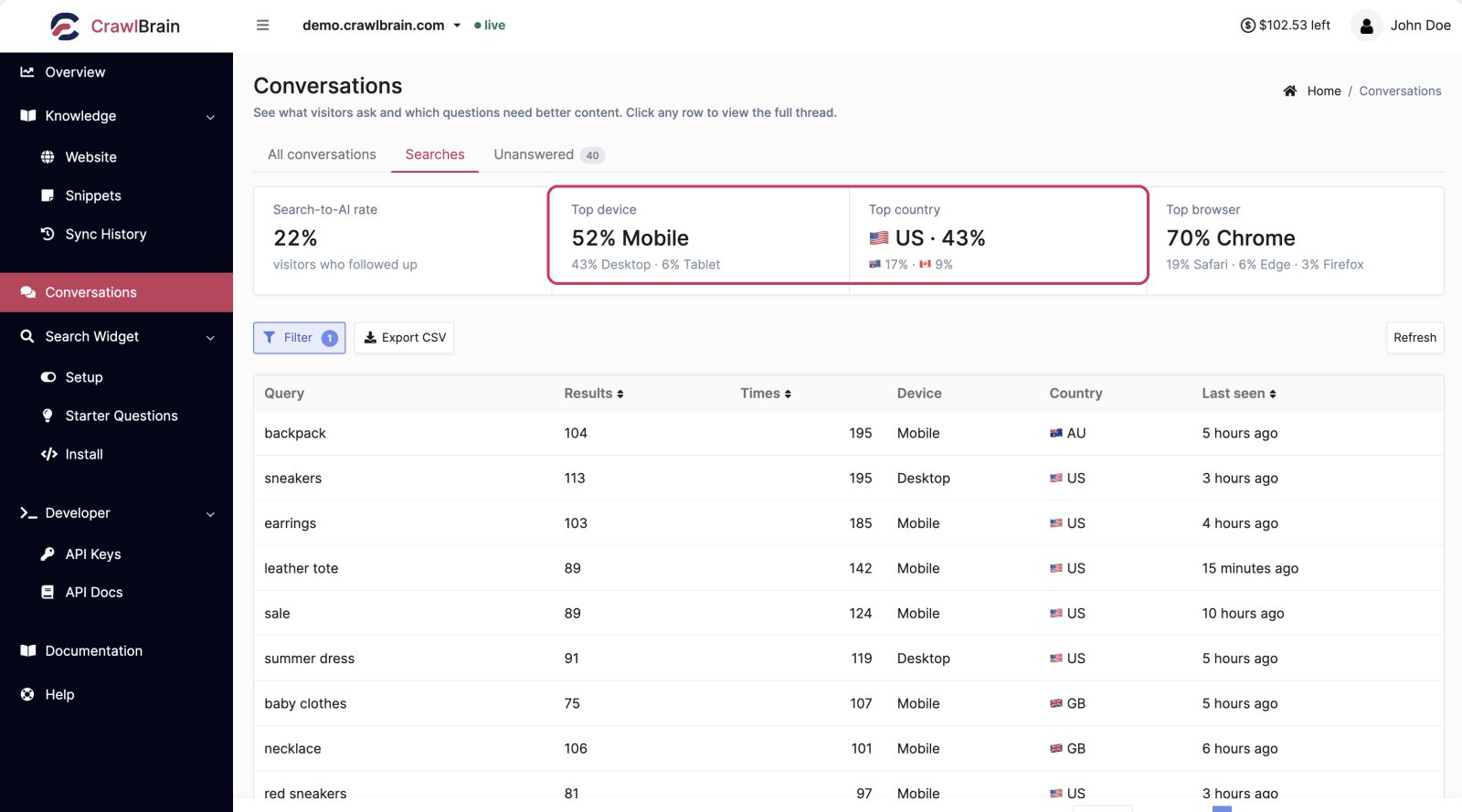
Where answers only show what people asked, searches show what they were looking for, including everyone who found their page in the instant results and never needed to ask.
Those visitors are usually the majority, and they are invisible everywhere else.
The four cards

Search-to-AI rate. The share of searchers who went on to press Enter and ask the AI. A low number is not a problem: it means the instant results were good enough.
Top device. The card splits searches between desktop, mobile and tablet. If mobile is high, go check the widget at 375 pixels wide.
Top country. The country your searchers come from is the single most useful number for deciding which languages to customise in Texts and Languages.
Top browser. You will mainly need it when chasing a rendering bug.
The table
| Column | Meaning |
|---|---|
| Query | Exactly what was typed |
| Results | How many pages matched |
| Times | How often this query was searched |
| Device | Desktop, mobile, or tablet |
| Country | Where from |
| Last seen | Most recent occurrence |
Sort by Times to find your real top queries, or by Results ascending to find the queries that matched nothing.
The three things this screen tells you
Which queries return nothing
Sort by Results ascending. Any query with zero or very few results is one of three things:
- Content you do not have. Write it, or add a snippet.
- Content you have that is not indexed. Check Pages and Sync History.
- A word your site does not use. If visitors search for "couch" and every page of yours says "sofa", semantic search will usually bridge it. If it does not, your customers use a different vocabulary than your copy does, and the fix is in your copy.
What your real top questions are
The top of the Times column is your genuine FAQ, ranked by demand and written in your visitors' words. It shows what people actually typed, whatever you or your team assumed it would be.
Use it for:
- Starter questions
- Which page to write next
- What belongs above the fold on your product page
- What your support macros should cover
Which markets you actually have
Read the Top country card, then scan the query column for non-English text.
If a quarter of your searches come from one country you do not serve content for, that is a market answering itself through translation right now. Customising that language's widget strings takes ten minutes.
Export
Export CSV downloads the current view, respecting whatever filter is active.
Hand your top 100 queries to whoever writes content, or diff this month against last month to see what changed after a release.
Filtering
You can filter by date range and country, and by device or free text. Filter to a launch week and read what people searched for: it is the most direct product feedback you will get.
What searches cost
Searches and answers both come out of your credit balance, and a search costs a tiny fraction of what an answer costs.
That gap is why the widget searches as people type and only calls the AI when someone presses Enter. Most of what your visitors do is nearly free.
Answers and Searches has the full explanation, and the Credits page has current prices.